

How to Launch Your First Ad Campaign on OpenAI Ads Manager
Think about how people shop now. It’s raining hard, your old jacket is soaked through, and instead of typing “raincoat” into Google, you open ChatGPT and ask: “What kind of raincoat should I get for heavy storms?”
ChatGPT gives you a genuinely useful answer: materials, features to look for, what to avoid. And underneath that answer, clearly marked as sponsored, there might be an ad for a waterproof jacket from a brand that sells exactly what you just asked about.
That’s the idea behind ChatGPT ads. The person has already told you what they need. The ad just has to show up at the right moment. For advertisers, that’s a very different opportunity from interrupting someone’s social media feed.
In this guide, I’ll explain what ChatGPT ads are, how the rollout has unfolded, how targeting works, and how to set up your OpenAI Ads Manager account step by step.
What are OpenAI Ads (ChatGPT Ads)?
ChatGPT ads are sponsored placements that appear inside ChatGPT conversations. When someone’s conversation is relevant to what a business sells, ChatGPT can show a labeled ad, usually below its answer.
It’s a new advertising channel alongside Google, Meta and the rest. Instead of targeting keywords typed into a search box or people’s social media behavior, ads are matched to what someone is actually talking about with ChatGPT.
How the rollout happened
OpenAI moved in stages, and it moved fast.
On February 9, 2026, OpenAI started testing ads in the U.S. The test covered logged-in adults on the Free and Go plans. Plus, Pro, Business, Enterprise and Education plans don’t show ads. In this early phase, ads were sold directly to a small group of large brands, with high minimum spends.
Over the following months, the pilot expanded, including to other markets such as Canada, Australia and New Zealand.
Then on May 5, 2026, OpenAI opened a self-serve Ads Manager in beta at ads.openai.com. For the first time, U.S. businesses of any size could sign up, set budgets, upload ads and manage campaigns themselves, with no minimum spend. The launch also added cost-per-click (CPC) bidding alongside the original CPM (cost per thousand impressions) model, plus conversion tracking through a pixel and a Conversions API.
Availability keeps expanding to new countries, so check ads.openai.com for the latest list of supported markets before you plan a campaign.
How many people use ChatGPT?
The audience is huge. In February 2026, OpenAI said ChatGPT had reached 900 million weekly active users, up from 800 million in October 2025. OpenAI has also said users send around 2.5 billion prompts a day.
Worth noting: OpenAI reports weekly users, not daily users, so any daily figure you see floating around is a third-party estimate. Also remember that ads only reach part of this audience, mainly adults on the Free and Go plans in supported countries.
Still, for many people ChatGPT has become the first place they go to research products, compare options and make decisions. That’s what makes it interesting for advertisers.
Why ChatGPT ads matter for marketers
The big difference is intent. On social media, you’re interrupting someone who came to see photos of friends. On ChatGPT, the person is actively asking for help with a specific problem. If your product solves it, you’re showing up at exactly the right time.
That context also makes ads feel less intrusive. Someone planning a dinner party who sees an ad for a meal kit is more likely to find it useful than annoying.
OpenAI has also set out some clear principles for how ads work, and advertisers should understand them:
– Ads don’t influence ChatGPT’s answers. They run on separate systems and are always labeled as sponsored.
– Conversations are kept private from advertisers, and OpenAI says it doesn’t sell user data to them.
– Users can turn off ad personalization and clear the data used for ads.
– Ads aren’t shown to users who are, or are predicted to be, under 18, and they don’t appear near sensitive topics like personal health, mental health or politics.
– Some industries, such as dating, health, financial services and political advertising, have been excluded, at least for now.
So if you’re in one of those restricted categories, check OpenAI’s current ad policies before you plan anything.
How does ChatGPT ad targeting work?
OpenAI hasn’t published every detail of its ad system, and it’s still changing. But the basics are clear from its own announcements.
When deciding which ad to show, OpenAI matches the ads advertisers submit against the topic of the current conversation. It may also consider a user’s past chats and past interactions with ads, unless the user has turned personalization off. If several advertisers are relevant, ChatGPT shows the one that best fits the conversation.
For example, someone researching recipes might see an ad for grocery delivery. Someone comparing running shoes might see an ad for a sports retailer.
Advertisers can bid on a CPC or CPM basis, and relevance matters. A strong, well-matched ad can compete with bigger budgets. That’s quite different from the way Google or Meta ads work, so expect a learning curve.
How to set up your OpenAI Ads Manager account
The signup process is fairly quick. Here’s how it works.
Step 1: Create your account
Head over to ads.openai.com. You’ll see a “Start now” or “Sign up” button right on the page, depending on when you visit.
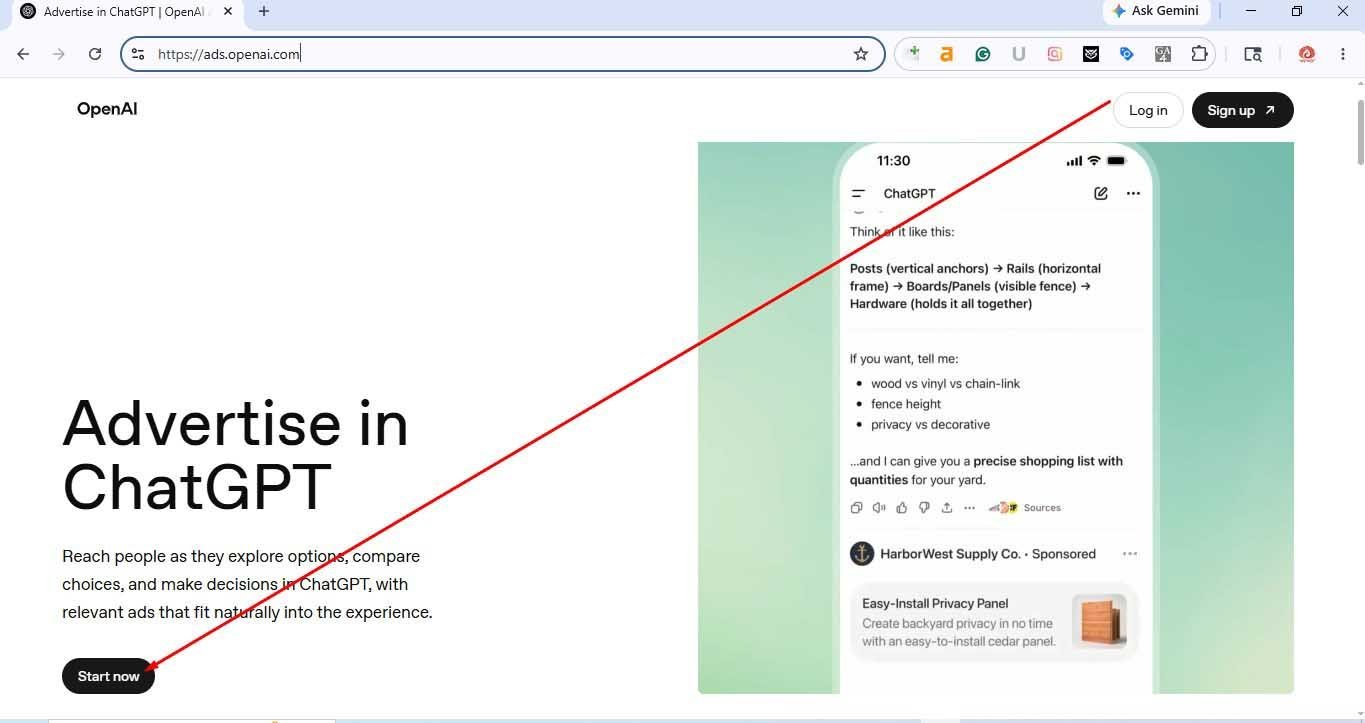
Enter your email address and create a password. OpenAI will send a verification code to your email. Enter it to continue. Then add your full name and your age.
Step 2: Tell OpenAI about your business
This is where the advertiser account itself gets set up. OpenAI asks for three things: your legal business name, your website and your industry. One thing to watch here. Use the name exactly as it appears on your registration papers, not a shortened brand name, because someone will compare the two during verification.
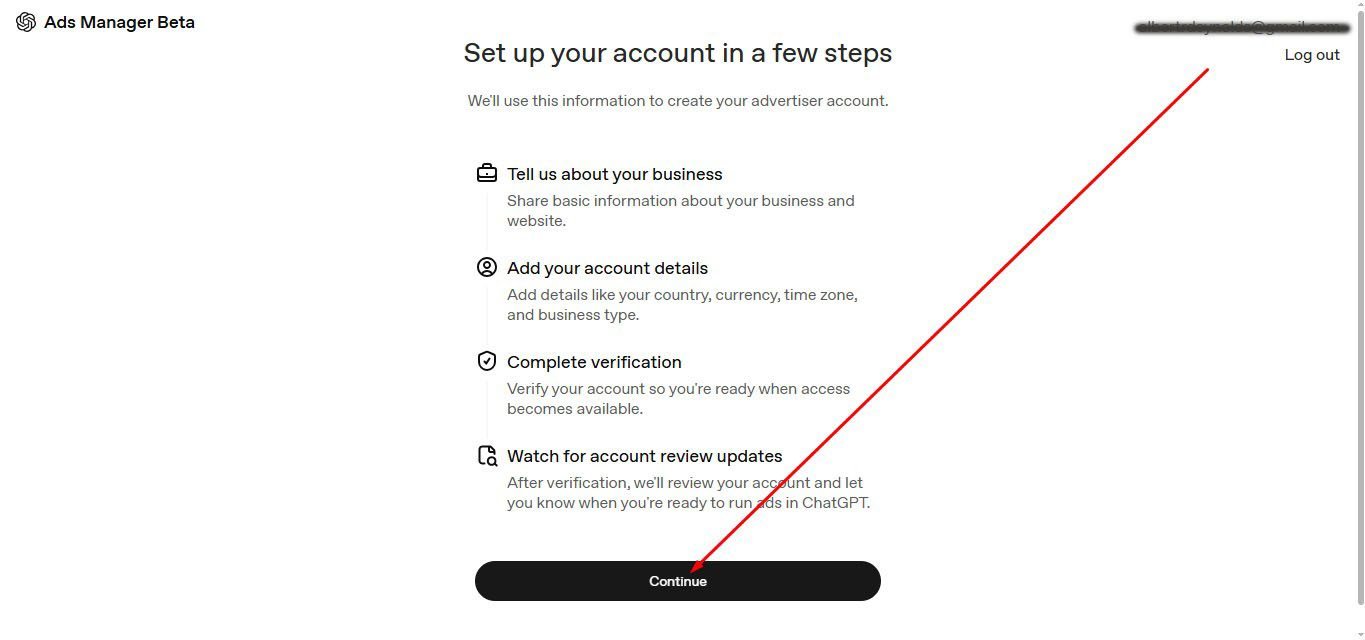
Step 3: Confirm your account details
Choose your country, currency and time zone, then select your advertiser type and business type. Click “Create advertiser account.”
Take a moment with the currency and time zone. They affect your billing and reporting, and they can be difficult to change later.
Step 4: Verify your business
Hit “Start verification.” OpenAI walks you through a few screens asking you to confirm your business details. Double-check everything before you submit, since a typo here can slow the review down.
Step 5: Wait for approval
Now it’s a waiting game. OpenAI reviews the application, and you can’t publish anything until it’s approved. It’s a good time to plan your first campaign so you’re ready to go the moment you get the green light.
What you can do once you’re approved
After approval, you can create campaigns, set budgets and bids, upload your ads and submit them for review.
Once they’re running, you can track performance in the dashboard, including impressions, clicks, spend, click-through rate (CTR), average cost per click (CPC), average cost per thousand impressions (CPM) and conversions.
To see what happens after the click, set up conversion tracking with OpenAI’s pixel or Conversions API, and add UTM parameters to your links so you can compare ChatGPT traffic with your other channels in Google Analytics.
My advice for a first campaign: start small, pick one product or service with a clear use case, write ads that directly answer the kind of question people ask ChatGPT, and give it a few weeks before judging the results. This channel is still new, and everyone is learning.
Get started with OpenAI advertising with MEK IT SEO
AI is changing how people search, compare and buy. Between generative engine optimization (GEO) and new channels like ChatGPT ads, the businesses that learn early will have a real head start.
At MEK IT SEO, we help businesses make sense of these changes. If you’d like guidance on GEO or on testing OpenAI advertising, get in touch with our team.