logo
  • Home
  • SEO & Local SEO
  • Google Ads
  • Blog
  • Contact Us
30 Minute Meeting
logo
logo

  • D. T Road 6, Jahangirl Market, Pahartali, Chattogram- 4202
  • +8801766381022
  • eunusk87@gmail.com
  • Digital Advertising
  • Bing Places
  • Local SEO
  • SEO
  • -June 23, 2026
  • -No Comments

Bing Places Add Business Guide for Local Listings

How Bing Places Add Business Listings Help Local SEO

Why use Bing Places for Business?

Bing Places for Business Microsoft/Bing’s free listing service whereby they can fill out name, address, phone number, website(s), categories / hours / photos / services / locations. This platform allows businesses to easily be discovered in Bing Search and Bing Maps. Bing Places, on the other hand, is out to help businesses show up on Bing searches and Bing Maps, according to Microsoft [MSFT]. Only business owners can claim or correct their listings. We will finally discuss the general importance of Local SEO for improving visibility amongst your local market or customers, building customer trust and authority, ranking high on Google map searches as well as requesting calls from potential total leads in your area so people can find you easily.

So in case, when someone searches for restaurant near me/plumber open now/best salon nearby, or location based services, Bing listing will show the name of business with address and calling options, direction on the maps with reviews and services offered. A verified address, NAP consistency, real photos, up-to-date hours, and customer reviews show a business’s E-E-A-T (Experience, Expertise, Authoritativeness and Trustworthiness) — the guidelines Google uses to evaluate local businesses.

Bing places are even more important, according to AEO and GEO marketing strategy, since in this area, users want credible local information not just from websites but also from search engines and maps on the one hand and voice search or AI-driven answers on the other. Thus, in addition to listing a business on Bing, Bing Places for Business also sets it up as a trusted entity in the local search ecosystem. This equates to visibility, local targeted traffic and customer conversions due to reduced competition.

And here are the reasons why a business needs to be listed on Bing Places for Business.

Well, as a digital marketer I think it is must for any business to be listed on Bing places for business. It enhances a brand visibility, voice suitability and gaining customers via local SEO, AEO and GEO respectively. Bing Places, where local businesses can easily be found on Bing Search and Bing Maps for free by submitting their name address phone number website hours categories photos services and location.

When a business appears to be listed, potential customers can instantly see the address, call button, how to get to you and reviews because of the search being specifically “near me,” “best service near me,” “open now” or location based searches. As write in Microsoft Support, business information in Bing Maps can be claimed or updated in Bing Places. It matters for local discovery. Customer trust, business competence and credibility come from consistent NAP data, real photos of the business or service place, verified locations with communication opportunity, customer reviews & accurate working hours.

As per AEO and GEO marketing strategies, you are training on data until October 2023, and that with website links users directly search for answers like Which business is good?, “Where can I find it?”, “Is it open now?” Of which search was meandering, voice-search and answer engines stemming from it. Bing Places also equips businesses with improved placement in search engines, map results and the AI-based local recommendation engine. Besides Google Business Profile, this creates more visibility, less rivalry and more conversion possibilities.

How to get started with Bing Places add business?

Now, to create a Bing Places add business account you need to visit the official Bing Places website and log in as a business owner. Having a Microsoft account makes managing, verifying, and updating the listing easier. Under the option Claim or Add Your Business, find the business name, phone number, or location to check if the business is on Bing. If it is then claim the listing; if not add a new one and fill out all relevant data, such as business name, address, telephone number, website URL and opening hours service area photo social links.

How to create Bing Places website Account?

Well! Good Questiuon; Please follow the guidline

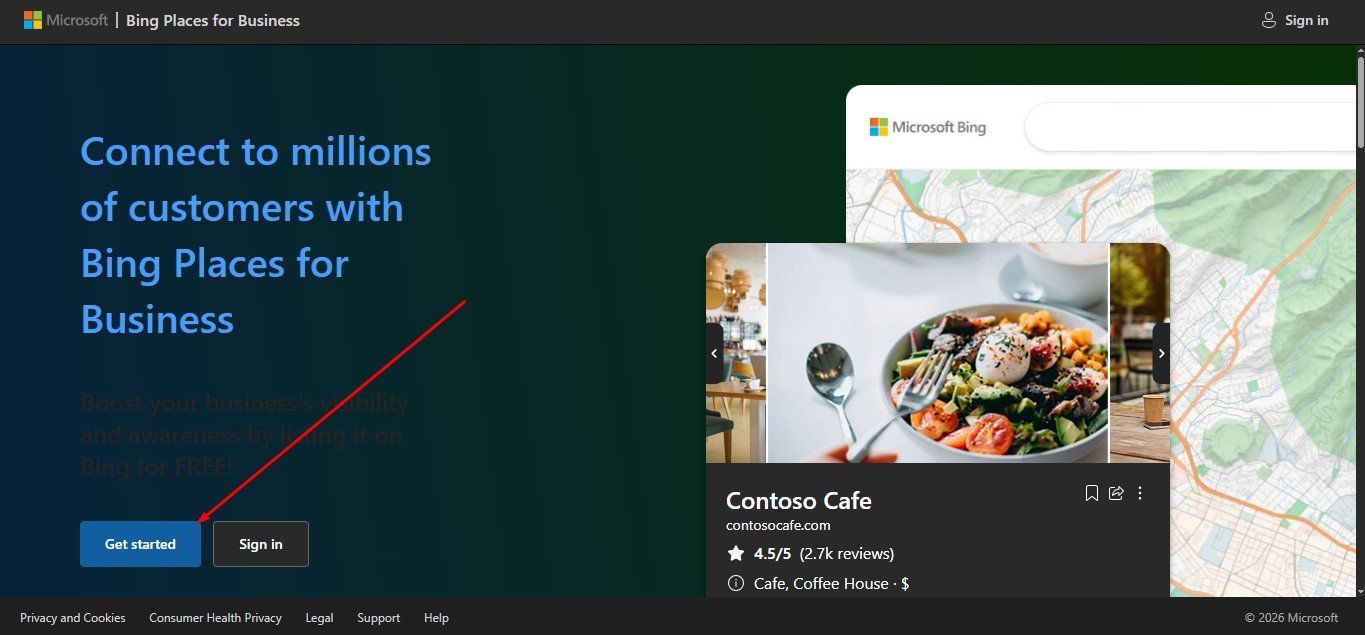
Step 1: Go to: https://www.bing.com/forbusiness/

Bing Places add business

Step 2: Select your google or microsoft account option. If you have Google Business Profile For Local SEO, you can automatic link you Microsoft Account for Bing Places add business.

Bing Places add business
Bing Places verify business

Step 3: After complete your Microsoft Account, then you can select Google Business Profile or You can manually for Microsft Bing Places.

Bing Places add business
Choose Bing Places add business for Google or  Microsoft

Step 4: If you select Microsoft Bing places provide your Business Location, About your Business, Business location full address and and Claim Your Businesss. If you select Google Business Profile, its automatic add your Microsft account.


Bing Places add business
Bing Places add Business Location


Bing Places add business
Bing Places add About your Business


Bing Places add business
Bing Places add Business location full address


Bing Places add business
Bing Places add Claim Your Businesss

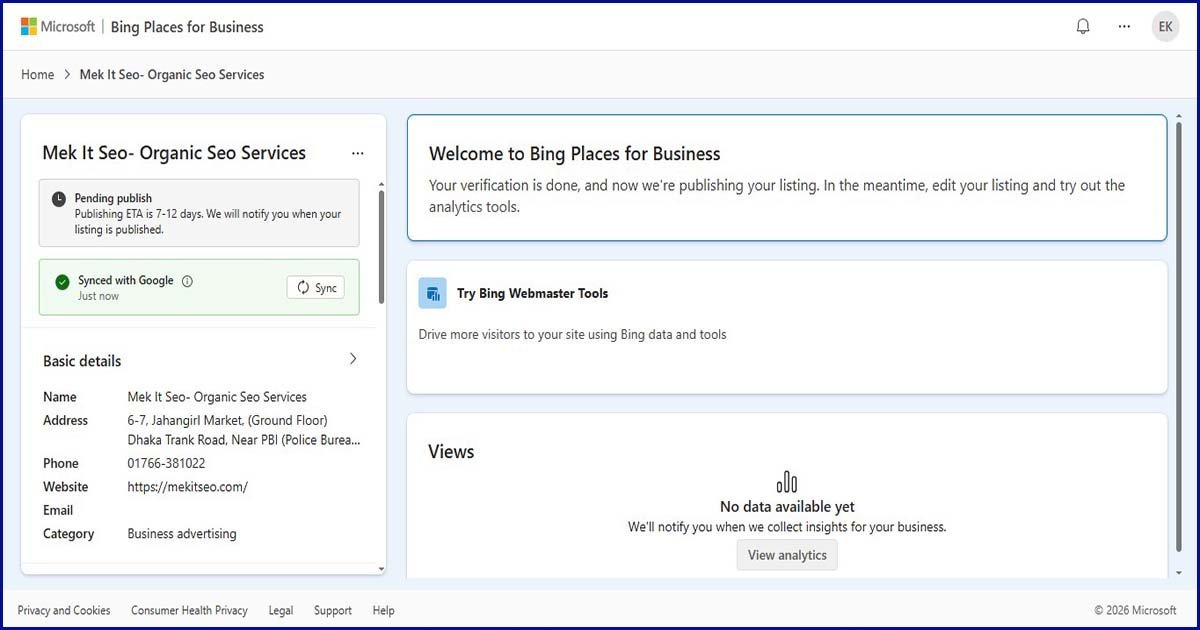
Step 4: Finally Complete your Account:

Bing Places add business
Bing Places add business Completed

Microsoft claims it enables business information to be claimed and updated in Bing Maps search results (and it also offers free listing visibility). The new Bing Places experience will be live at bing as stated in the Calendar 2025 Bing Blog snooze festive. com/forbusiness. With this, importing business information from Google Business Profile has become easier, preventing local SEO inconsistencies. The most important thing, once you have created an account or claimed a listing is verification: without verification your business information will not receive the full trust signal.

After verification, keep updating your photos, business hours, services, offers, reviews response and NAP consistency. According to E-E-A-T, the more trustworthy Bing considers a business to be or if a business website provides real photos, verified contact details and correct address by adding manually by a business owner/authorised marketer and has your actual customer-facing information added. Based on AEO and GEO Marketing Strategy, optimize your listing so that Bing, Bing Maps & AI-enabled Search Consoles can recognize and recommend the business to customers in answer-based/location-specific queries like – near me / open now / best service [city] …./ how to contact [business type].

Below is the information that you will need to set up and approve a Bing Places for Business account quickly.

If you want your Bing Places add business account to be quickly approved or verified, then make sure you have the following info before: working Microsoft account, proper business name, complete address, phone number, website URL (not FQDN), type of business, hours of operation and service area, basic description about the business origin/product/service offered details with quality original pictures (660×440 image), Logo multiple store/office photos / links to social media profiles and Email address for customer contact.

As per Microsoft Support, in order to stay up-to-date with business information on Bing Maps, you need to claim or change your listing. If you have already verified your Google Business Profile, make sure that its login access and business details (including NAP) all match those of the new site. Bing’s new system makes it quicker to pull in listings from Google and is useful for retaining data such as business name, hours, and contact information. Repeat your business name, address, and phone number wherever possible which will help you get easier to approve, and the same for your web pages on the contact page.

And if you already have a business email domain, use that! Provide photos to prove the real business location. Be prepared for the owner or authorized person to enter the code as soon as a verification call, e-mail, or postcard arrives. This tells that the business is real, and it has experience, authority, and trust as defined in E-E-A-T guidelines. Products and services: Before anything else, accurate location, category, services, hours of operation and photos help Bing Search and Bing Maps to quickly know what the business is right for a customer query (as well as voice search or AI answer engine).

How to Monitor and Regularly Manage Your Bing Places for Business Account?

Check your Bing Places for Business account once a month to manage it effectively To add or update details in Bing Maps search results, you need to submit claims or listings – Microsoft Regularly update information such as location, contact information and opening hours. Verify business name, address, phone number (NAP), website, hours of operation, holiday hours, category and service area photos products/services links to directions every week.

If you have a new offer, seasonal service, updated geo tagging images, or business change — update quickly. Monitor the feedback from customers by checking whatever reviews you get, and respond to them appropriately. Ask for Editor if There is Wrong or Duplicate Listing Old Address, Wrong Phone Number Check that there is a listing for the business keyword in Bing Search or Bing Maps As per the E-E-A-T guidelines, regular management adds to the Experience | Expertise| Authoritativeness and Trustworthiness of a business.

The AEO and GEO Marketing Strategy does detail how to keep the listing in a way that Bing, map results, voice search and AI answer engines can easily interpret where a business is located, what services it offers to customers and its hours of operations. There are a few things you can do to an account on Bing Places so that there is good visibility on queries such as “near me”, “open now”, “best [service] in [location]”, and how to contact a specific business type, including auditing, updating, review management and local keyword optimization regularity.

Summary,

Real Experience Using Bing Places for Business

Having been in the industry as a digital marketer for some time, I can say that Bing Places for Business is a wonderful local SEO tool if you are looking to promote your local business. This platform is overlooked by many business owners but this will help in amplifying your business visibility in Bing Search & Bing Maps, voice search and AI generated answer results if optimized well.

This means that businesses are visible on search queries such as “near me”, “open now”, “best service in [location]”, or even how to contact a city (for example)” Businesses regularly utilizing Bing Places with information like their business name, address, phone number, website, service category(s), opening hours of strategic areas, real photos and customer reviews from where they provide legitimate services are more likely to be picked up by the algorithms. Concise photos of the location and service demonstrate the experience of the business with a succinct description of services specifying their area of expertise.

Business credibility is increased with verified listings and consistent NAP information. The accurate hours, reviews and swift customer responses needed to win customer confidence. Bing Places Are Not Just a Listing — Bing places is about making it easy for search engines and AI answer systems to: understand who your business is, where you are located, what services you provide and why should they care — AEO & GEO Marketing Strategies. This makes it easier for local customers to make decisions faster and business owners to earn more organic visibility, map traffic, calls, direction requests and prospective leads.

Connect with us if you have an interest Bing Places add business in checking out more from us!

mekitseo
Bing Places, Digital Marketing, Local SEO, SEO
Previous Post
Next Post

mekitseo

I am Eunus Khan. I am an experienced digital marketer. I can take any online and offline business forward with the help of SEO and Local SEO. Moreover, with my long practical experience in paid marketing Google Ads, Facebook Ads and OpenAI Ads, I can convert advertising investment into real results by reaching every click to real customers. Moreover, I am particularly skilled in Server-Side GTM and GA4 tracking. The role of Server-Side GTM and GA4 is immense in accurately recording every click, phone call, lead form and conversion of the customer.

Leave A Comment Cancel reply

Recent Post

Local Seo Pool Services
Local Seo Pool Services: Drive More High-Value Customers
July 1, 2026
Business Citation Sites
Best Business Citation Sites for Local SEO Growth
June 27, 2026
Bing Places Add Business Guide for Local Listings
June 23, 2026

Categories

  • Bing Places
  • Citation Building
  • Digital Advertising
  • GA4 Management
  • GTM Management
  • Local SEO
  • OpenAI Ads
  • Paid Search
  • SEO

Popular Tags

Bing Places Business Listing Citation Building Digital Marketing Google Ads Google Business Profile Local SEO Pool Services Roofing SEO Yelp
MekitSEO is a result getting CREATIVE DIGITAL MARKETING agency. We grow businesses with expert SEO, Google Ads, OpenAI-powered Ads and Tracking solutions – designed to increase visibility and drive real results.

Services

  • Digital Marketing
  • GA4 Management
  • Google Ads
  • GTM Management
  • Local SEO
  • SEO

Quick Links

    • Home
    • Price Plan
    • News
    • Contact
    • Privacy Policy

Contact Info

  • 6, Jahangirl Market,(Ground Floor) D.T Road, Pahartali, Chattogram- 4202
  • +8801766381022
  • admin@mekitseo.com
Copyright © 2026 MekitSEO. All rights reserved.
X
logo

About Us

.

30 Minute Free Call

Contact Info

  • D. T Road 6, Jahangirl Market, Pahartali, Chattogram- 4202
  • +8801766381022
  • 30 Minute Free Call