

Why You Should List Your Business on Yellow Pages Free Today
I’ll admit it. Early in my career, I thought Yellow Pages was a relic. Something your parents used to prop open a door. Then I worked on a local SEO project for a restaurant, and one of the first things we did was set up their Yellow Pages listing properly. Within about 60 days, their position in Google’s Local Pack had improved noticeably.
Yellow Pages wasn’t the only thing we changed, of course. But it was part of the foundation, and that project changed how I think about it. Since then, I’ve seen clients grow their organic website traffic by 15 to 25 percent after we cleaned up their citations, with Yellow Pages as one of the key pieces. Keep your NAP consistent, write a strong description, reply to reviews, and this old directory still pulls its weight.
What Yellow Pages is today
Most people remember Yellow Pages as the thick yellow book that listed businesses by category. Today it lives online at yellowpages.com (also yp.com). Businesses can list their name, address and phone number (NAP), website, hours, photos and reviews there.
From a local SEO point of view, Yellow Pages is a citation source: another trusted website confirming that your business exists and where it’s located. When your details match across Google, Yellow Pages and other directories, Google has more reason to trust your information. That consistency is one of the things that helps businesses climb in Google Maps and the Local Pack. And, of course, some customers still search Yellow Pages directly to find a plumber, a dentist or a restaurant.
Why your business should be listed
In my experience, businesses with a well-maintained Yellow Pages listing usually have a stronger local SEO footing than those without one.
Part of that is simple trust. Yellow Pages has been around forever, and Google knows it. When a site that old and well-known confirms your address and phone number, that counts for something. Every accurate listing also backs up the same NAP details you use everywhere else, and that consistency is really the whole game in local SEO.
Then there’s the traffic. It’s not Google-sized, obviously. But plenty of people still browse Yellow Pages when they need a plumber, an electrician or a locksmith, and every one of those searches is a customer you’d miss if you weren’t there.
I’ll be straight with you about one thing, though. A lot of blogs claim Yellow Pages gives you a powerful backlink. In most cases the link is nofollow, so it won’t do much for your link profile. That’s fine. The citation is the real prize, not the link.
How to list your business on Yellow Pages for free
Adding my clients to Yellow Pages is usually one of the first things I do in a local SEO project. It’s free and doesn’t take long.
Go to yellowpages.com and look for the option to add or claim your business. Search for your business first. If it’s already there, claim it. If not, add it as a new listing. Then fill in your business name, category, address, phone number and website carefully.
Here’s where people slip up. Whatever you enter has to match what’s on your Google Business Profile, Facebook, Yelp and your own website. It sounds picky, but something as small as “Suite 5” on one site and “Ste 5” on another can muddy the picture for Google. Small stuff, but it adds up.
You’ll then create an account and verify it, usually by phone call or text message. Once verified, complete your profile fully: hours, payment methods, service area, good photos and a clear description that naturally includes the services you offer. In my experience, complete profiles get noticeably more views and engagement than half-finished ones.
Finally, ask happy customers to leave a review. Good reviews make your listing stand out and help new customers feel confident choosing you.
Step-by-step: claiming your Yellow Pages listing
Step 1: Get your information ready
Before you start, gather everything in one place. It makes the process much faster.
– Business name
– Street address
– City
– State
– Zip code
– Country
– Phone number
– Website
– Business email
– Business description
– Business hours, for example:
Monday to Friday: 8:00 AM – 6:00 PM
Saturday: 9:00 AM – 4:00 PM
Sunday: Closed
– Social media links: Facebook, LinkedIn, Instagram, X, YouTube
Step 2: Go to the claim page
Visit https://www.yellowpages.com/claim-your-listing

list business on yellow pages free
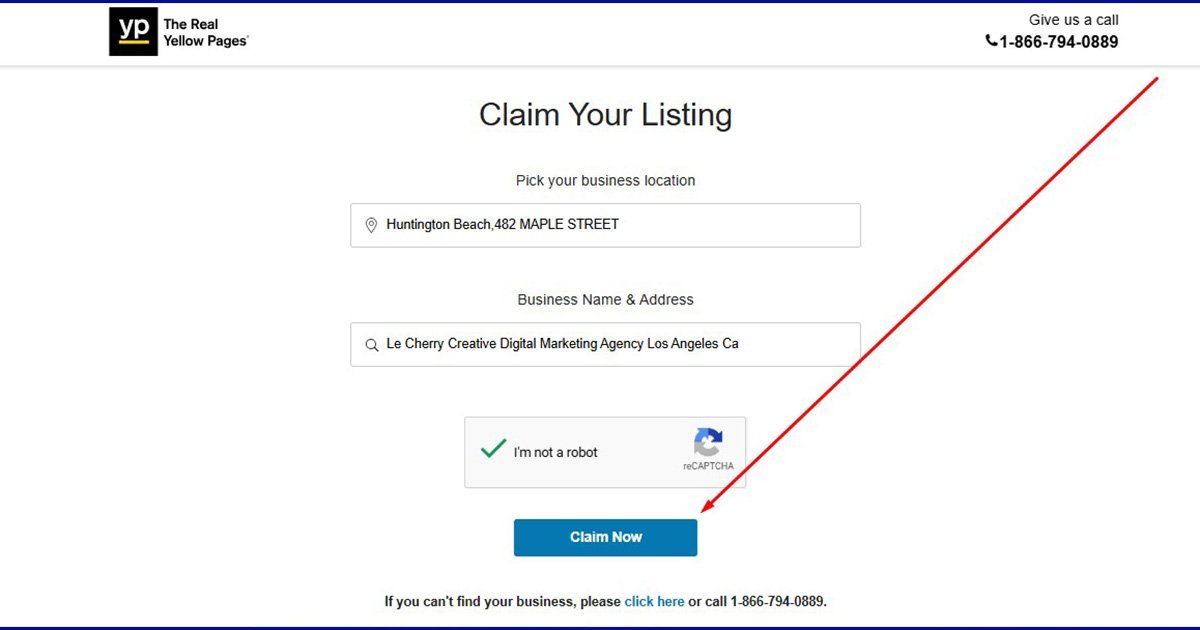
Step 3: Find and select your business
Type in your business name and pick the right location from the results. When I did this for our own agency, it showed up as Creative Digital Marketing Agency, 21411 Bowsprit Ln, Huntington Beach, CA 92646, (714) 334-3530. If you don’t see yours at all, don’t worry. You’ll just add it as a new listing.

Step 4: Create your account
Yellow Pages will ask for your contact details so it knows who’s claiming the profile. Fill those in and set up your login. Use an email you actually check, because that’s where updates and review notifications will go.
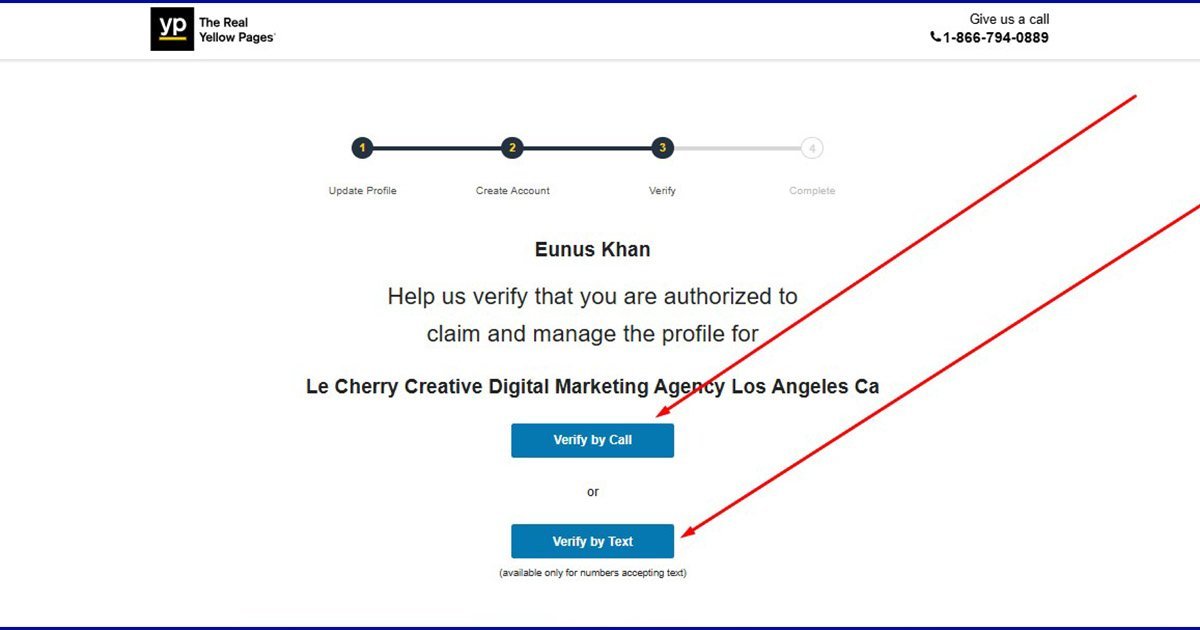
Step 5: Verify your business
You’ll get a choice between a phone call and a text. I usually go with text since it’s quicker. A code comes through, you type it in, and that’s it.


Step 6: Update your listing
That’s the hard part done. Your listing is now live, and you can go in and edit anything whenever you need to. Don’t stop here, though. Add your photos, hours and description straight away while you’re logged in.
How to manage your Yellow Pages listing
Listing your business is the start, not the finish. A listing that’s ignored slowly goes out of date, and outdated information hurts both your rankings and your customers’ trust.
Log in at least once a month and check that your name, address, phone number, website and hours are still correct. If anything changes, update it right away rather than letting it slide.
Look at your stats too. See how many people viewed your listing, called you or clicked through to your website. If certain services get more attention, mention them more clearly in your description.
Reviews deserve regular attention. I try to reply to every new review within a day or two, good or bad. With negative reviews, stay polite and focus on solving the problem. Future customers read those replies, and a thoughtful response often wins more trust than the complaint loses.
Every few months, refresh your photos and add any new services, offers or seasonal promotions, like an Eid special or a New Year discount. An active listing simply looks more trustworthy than one that hasn’t changed in years.
Finally, check out your competitors’ listings. What photos do they use? How do they describe their services? Use what you learn to make your own profile stronger.
Managed well, a Yellow Pages listing is more than an entry in an old directory. It’s a small but solid part of your local SEO and your overall online presence.
Want help getting started? Get in touch and we’ll help you list your business on Yellow Pages for free and set it up the right way.